Category Archive Blog

Activate conditions and formulas for pricing

Use program RV80HGEN.

Sometimes the standard automatically add this report in transport request (TR).
If not done automatically, you can add it manually in your workbench TR :
Display the object list of your transport request or task. Switch to Change mode, insert row :

R3TR | XPRA | RV80HGEN

Read More

Calculate the runtime with ABAP

Calculate runtime in microseconds :


DATA: lw_t1          TYPE i,
      lw_t2          TYPE i,
      lw_elapsed     TYPE i.
 
* Get the time and put in lw_t1.
GET RUN TIME FIELD lw_t1.
 
* Wait 3 seconds.
CALL FUNCTION 'ENQUE_SLEEP'
  EXPORTING
    SECONDS = 3.
 
* Get the time and put in lw_t2.
GET RUN TIME FIELD lw_t2.
 
* Calculate the different between lw_t2 and lw_t1.
lw_elapsed = lw_t2 - lw_t1.          " In microseconds.
lw_elapsed = ELAPSED / 1000000.      " In seconds.
 
* Display the runtime.
WRITE:/ ' Runtime =', lw_elapsed, 'seconds'.

If your measure may overload 36 min, do not store the run time in a type i (integer) variable.
You should use a type numeric, like :


DATA: lw_t1(200)          TYPE n,
Use statement CLIENT SPECIFIED when mandant is specified in SELECT statement

If you want to add the mandant in your where clause (to force use of an index for instance), you have to add statement CLIENT SPECIFIED.


    SELECT * FROM table_name CLIENT SPECIFIED INTO TABLE gi_table_name
      FOR ALL ENTRIES IN li_table
      WHERE mandt     = sy-mandt                 " To force Index 001
        AND field1    = li_table-field1
        AND field1    = li_table-field2.

Display messages in popup


  CALL FUNCTION 'C14ALD_BAPIRET2_SHOW'
    TABLES
      I_BAPIRET2_TAB = T_RETURN_MESSAGE. " T_RETURN with type BAPIRET2_TAB

Add message in BAPIRET2 table

Quick way to add message from system variables :


  APPEND VALUE bapiret2( type       = sy-msgty
                         id         = sy-msgid
                         number     = sy-msgno
                         message_v1 = sy-msgv1
                         message_v2 = sy-msgv2
                         message_v3 = sy-msgv3
                         message_v4 = sy-msgv4 ) TO lt_bapiret2.

Via dedicated form :

Read More

Display transport request (TR) informations in ABAP

Use FMs :

  • STRF_READ_COFILE
  • TR_READ_GLOBAL_INFO_OF_REQUEST

Search tag: TO, Transport order, ordre de transport, OT

SAP PM transaction codes

Here are only displayed the transaction I most use.

IL03 : Display Functional Location (Afficher poste technique)

IQ03 : Display Material Serial Number (Afficher le numéro de série d’un article)

IE03 : Display Equipment (Afficher Equipement)

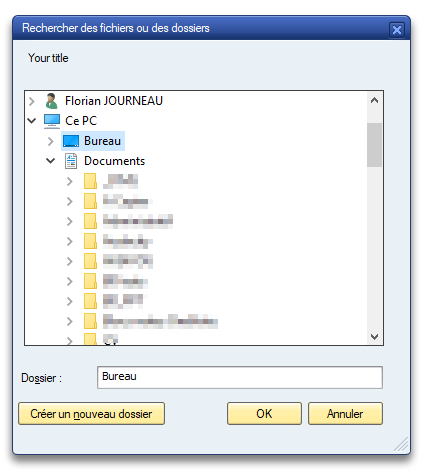
Open popup window to choose a diretory

Use method : cl_gui_frontend_services=>directory_browse.

Read More