Author Archive fjourneau

Round number in ABAP

Use ceil( ) or floor( ) to round decimal to integer, respectively to upper or lower integer value.


  DATA(lv_upper_value) = ceil( '0.333' ). " ==> 1

  DATA(lv_lower_value) = floor( '1.66' ). " ==> 1

Use the round( ) method to have more possibilities :


  DATA : lv_percentage TYPE numc3.
  " [...]

  " In this case, the percentage calc is round to lower integer value :
  lv_percentage =  = CONV #( round( val  = lv_num / lv_total * 100
                                    dec  = 0
                                    mode = cl_abap_math=>round_down )  ).

You can specify in wich mode you want to round number with :

CL_ABAP_MATH=>ROUND_HALF_UP	|	Round away from zero if value is exactly half
CL_ABAP_MATH=>ROUND_HALF_DOWN	|	Round to zero if value is exactly half
CL_ABAP_MATH=>ROUND_HALF_EVEN	|	Round so last digit is an even no. if value is exactly half
CL_ABAP_MATH=>ROUND_UP		|	Round away from zero
CL_ABAP_MATH=>ROUND_DOWN	|	Round to Zero
CL_ABAP_MATH=>ROUND_CEILING	|	Round to Positive Infinity
CL_ABAP_MATH=>ROUND_FLOOR	|	Round to Negative Infinity

Search tag : arrondi, arrondir, entier, valeur supérieure, inférieure

Quicky manage SLG1 messages in ABAP

This post provides methods or macro for logging SLG1 message.
It is shortcuts for calling standard methods :
– BAL_LOG_CREATE
– BAL_LOG_MSG_ADD
– BAL_DB_SAVE

Read More

Template for ABAP local ALV event class

Local ALV event class template (to be completed with missing events) :

Read More

Clear Adobe form cache

If you work with adobe form translations, you will see that translations are not effective immediately. It is because of cache.

To clear the cache, launch program : FP_PDF_TEST_26 .

Search tag : refresh, buffer, pdf

Adobe form: set field color dynamically with javascript

To specify with javascript the color for a text field in adobe form, use the code below.


// data.MAIN.SUBFORM.FIELD_TO_CHANGE_COLOR::initialize - (JavaScript, client)
this.font.fill.color.value = "255,0,0"; // Color Red in RGB Color

The color has to be specified in 🔗 RGB format.

Read More

Reverse sorting of an internal table

Use method CL_RS_DATA=>SWITCH_ORDER( ) :


  cl_rs_data=>switch_order( CHANGING c_t_data = lt_my_table ).

Technically, the method loops on table entries and insert each of them with INDEX 1.

Read More

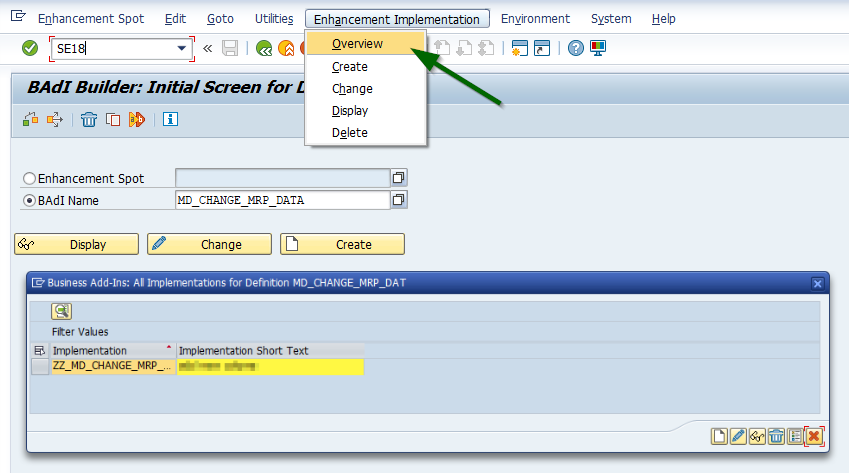
Check if BADI is implemented

Transaction SE18, enter your BADI name and go to
Enhancement Implementation –> Overview :

Generate a random number in ABAP

Use class CL_ABAP_RANDOM_INT to generate a random integer number :


DATA(lv_random_num) = cl_abap_random_int=>create( seed = cl_abap_random=>seed( )
                                                  min  = 1
                                                  max  = 100 )->get_next( ).
* lv_random_num will be type i

Read More

DELKZ : Code list of MRP elements

Most used :
ValueDesignation ENDesignation FR
AR Dependent reservationRéservation dépendante
FE Production orderOrdre de fabrication
PP Planned independent requirementBesoins indépendants Prévisionnel (BIP)
QM Inspection lot for quality management Lot de contrôle QM
SA Simulation orderOrdre de simulation
SM Sim. dependent reqmtsBesoin dépendant de simulation
WB Plant stockStock division
All values :
Read More

Create ALV with class CL_SALV_TABLE

Example of implementation in SE38 : SALV_DEMO_TABLE_SELECTIONS.

Simply display ALV table


  DATA : go_alv_table TYPE REF TO CL_SALV_TABLE.

  TRY.
    cl_salv_table=>factory( IMPORTING r_salv_table = go_alv_table
                             CHANGING t_table      = gt_table_to_display ).

    CATCH cx_salv_msg.
  ENDTRY.

  " Optimize columns width
  DATA(lo_columns) = go_alv_table->get_columns( ).
  lo_columns->set_optimize( ).

  " Apply zebra style to lv_rows
  DATA(lo_display) = go_alv_table->get_display_settings( ).
  lo_display->set_striped_pattern( cl_salv_display_settings=>true ).

  " Display ALV
  go_alv_table->display( ).

Read More